

Vending machine software UK: 9 best proven features to know
Telemetry, sales reports, stock alerts, route planning and cashless dashboards, and how to choose the right system.
Running vending machines used to mean driving to each site to see what had sold. Today, vending machine software shows sales, stock and faults on your phone before you leave home.
This guide explains what vending machine software does, the features that matter most, how it connects to your machines, what it costs and how to choose the right system for your business.
Quick answer: Vending machine software collects data from each machine through a telemetry device, usually built into the card reader. It shows live sales, stock levels, cash and card takings and faults, so you restock only what’s needed and spot problems early.
For one machine, simple records may be enough. Once you run several machines or sites, vending machine software saves time, fuel and lost sales.
Machines ready for telemetry
Card payment with telemetry from £10 a month plus 2% per transaction, with free UK delivery and installation.
Browse Machines →What is vending machine software?
Vending machine software is a system that collects data from your machines and turns it into reports you can act on. It’s sometimes called a vending management system, or VMS.
The software shows what each machine has sold, how much stock is left and whether anything needs attention. Most systems work through an app or a web dashboard.
It works hand in hand with telemetry, the hardware that sends data from the machine. Our vending machine telemetry guide explains the hardware side in detail.
How vending machine software connects to your machines
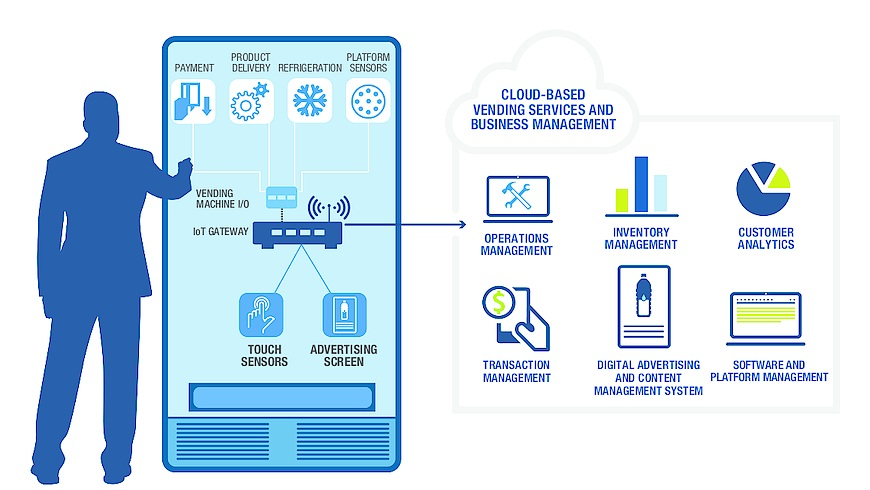
Most modern machines have a control board that records every sale. A telemetry device, often built into the card reader, reads that data.
The device then sends the data over mobile data or Wi-Fi to the provider’s servers. Vending machine software turns it into dashboards, alerts and reports.
Older machines can often be upgraded with a modern card reader and telemetry unit. That means even a classic machine can feed data into your software.
The technology behind telemetry
Most vending machines use an industry standard called MDB to connect payment devices, such as coin mechs, note readers and card readers, to the machine’s controller. That’s why a modern card reader can be added to many older machines.
Machines also store audit data, often in a format called DEX, which records sales and cash totals. Telemetry devices read this data and send it on.
You don’t need to understand the technical detail to use the system. But it helps to ask a supplier whether your machine supports these standards before you buy a reader.
Mobile signal and connectivity
Telemetry usually sends data over a mobile network, so signal matters. Basements, metal buildings and remote sites can have weak coverage.
Check the signal where the machine will stand before installation. Some devices can use Wi-Fi or an external aerial if mobile signal is poor.
If a device loses connection, most store data and send it once the signal returns. Card payments may still need a connection to work, so test this on site.
Vending machine software: 9 proven features
1. Live sales reports
See sales by machine, product and time of day. You’ll quickly learn which products and sites earn the most.
2. Stock level tracking
Vending machine software estimates what’s left in each spiral or column. You know what to bring before you set off.
3. Low-stock and sell-out alerts
Get a notification when a popular product runs low. Fewer sell-outs means fewer lost sales.
4. Fault and error alerts
Be told when a coin mech jams, a card reader goes offline or a fridge gets too warm. You can fix problems before customers notice.
5. Cash and card reconciliation
Compare expected cash with what you collect, and see every card payment. It helps you spot errors or theft.
6. Route planning
Plan restocking visits around which machines actually need attention. Our vending machine route guide covers this in more detail.
7. Planograms
Map which product goes in which slot, and update it as you change your range. See our vending machine planogram guide.
8. Remote pricing
Some systems let you change prices from your phone. This depends on the machine and payment hardware.
9. Exports for accounting
Download sales data for spreadsheets or accounting software. It makes record keeping and tax returns much easier.
Vending machine software vs manual record keeping
| Task | Manual | With vending machine software |
|---|---|---|
| Know what sold | Count stock on site | Live on your phone |
| Plan restocking | Visit every machine | Visit only machines that need it |
| Spot faults | When you next visit | Instant alerts |
| Track takings | Count cash by hand | Cash and card reports |
| Records for tax | Notebook or spreadsheet | Automatic exports |
Why vending machine software saves money
Every unnecessary visit costs fuel and time. Vending machine software shows which machines need restocking, so you skip the ones that don’t.
Sell-outs are another hidden cost. If a popular drink runs out on Monday and you visit on Friday, you’ve lost four days of sales.
Alerts and sales data fix both problems. For a growing route, the savings in time and lost sales can easily cover the monthly fee.
Cashless payments and vending machine software
Card readers and telemetry usually come together, so cashless payments and vending machine software go hand in hand. Each card sale is recorded instantly and shows up in your dashboard.
Customers increasingly expect to tap a card or phone. Our vending machine cashless payment and contactless vending machine guides explain the options.
At Irelley, card payment with telemetry costs £10 a month plus 2% per transaction. That gives you cashless sales and live data in one package.
What vending machine software costs
Most providers charge a monthly fee per machine, sometimes with a set-up cost for the hardware. Card payments usually carry a small percentage fee on each transaction.
Prices vary by provider and features, so compare what’s included. Check whether alerts, route planning, remote pricing and accounting exports are part of the standard plan.
For most operators, vending machine software pays for itself once it saves a few wasted trips or prevents a few sell-outs each month.
How to choose vending machine software
- Compatibility: check it works with your machines and payment hardware.
- Ease of use: try the app and dashboard before you commit.
- Alerts: look for low-stock, sell-out and fault notifications.
- Reports: make sure you can see sales by machine, product and time.
- Exports: check you can download data for your accountant.
- Support: UK-based support helps when something goes wrong.
- Contract: check for minimum terms and cancellation fees.
Vending machine software for one machine vs a route
If you run one machine on your own premises, you may not need full vending machine software. A card reader with basic telemetry already shows sales and takings.
Once you have machines at several sites, software becomes far more valuable. Route planning, alerts and reports save hours every week.
Many operators start simple and add features as they grow. Our start a vending machine business guide covers the early stages.
Using sales data to grow profit
The real value of vending machine software is what you do with the data. Look for your best sellers, slowest lines and busiest times at each site.
Swap slow products for new ones, and give best sellers more slots. Test small price changes and watch how sales respond.
Our vending machine pricing and vending machine sales guides explain how to use this data. You can also estimate returns with our profit calculator.
Key reports to check every week
Dashboards can show a lot of numbers, but a few reports matter most. Checking them once a week keeps your route on track.
- Sales by machine: shows which sites are growing and which are slowing down.
- Top and bottom products: tells you what to stock more of and what to drop.
- Sales by hour and day: helps you restock before busy periods.
- Cash vs card split: shows how customers prefer to pay at each site.
- Faults and downtime: highlights machines that need servicing.
Using data to choose better sites
Sales data doesn’t just help you run existing machines. It also shows what a good site looks like for your business.
Compare your best and worst sites by footfall, opening hours and customer type. Use those patterns when you approach new locations.
If a site consistently underperforms, the data gives you a clear reason to move the machine. Our vending machine locations guide explains how to find stronger sites.
Sharing reports with site owners
Many site owners receive a commission based on sales. Clear sales reports make those payments transparent and build trust.
Some systems let you export a simple monthly statement for each site. It saves arguments and shows you’re running a professional operation.
Our vending machine commission rates guide covers typical deals with site owners.
Features by business size
| Business size | What you need | Why |
|---|---|---|
| 1 machine on your premises | Card reader with basic telemetry | Sales and takings at a glance |
| 2–5 machines | Sales reports and low-stock alerts | Fewer wasted visits |
| 5–20 machines | Route planning and planograms | Efficient restocking across sites |
| 20+ machines | Full management system with exports | Staff, stock and accounts at scale |
An illustrative example
Imagine an operator with eight machines across offices and gyms, restocking every machine twice a week. That’s 16 visits, many to machines that barely need anything.
With telemetry, the operator sees that only five machines need a mid-week top-up. Visits drop, fuel costs fall and the time saved goes into finding new sites.
This is a simple example, and results vary by route. But it shows why data-led restocking is the main reason operators invest in software.
Vending machine software for smart machines
Smart machines rely on software even more. A smart fridge, for example, tracks what each customer takes and charges their card automatically.
Our 24H smart vending fridge uses cashless unlock and digital tracking. Our smart vending machine guide explains how these systems work.
Large glass-front machines with tap-to-pay, such as our tap to pay vending machine, also pair well with telemetry.
Record keeping and tax
Good records make tax returns much simpler. Vending machine software can export sales, card takings and dates in a format your accountant can use.
Under Making Tax Digital for Income Tax, sole traders and landlords with qualifying income over £50,000 must keep digital records and send quarterly updates from April 2026, with the threshold falling in later years. Software exports make this easier.
Our vending business tax guide covers the basics. Always check with an accountant what applies to you.
Does software replace site visits?
No. Machines still need restocking, cleaning and the odd repair in person. What changes is how often you go and what you take with you.
Instead of fixed weekly rounds, you visit when the data says a machine needs attention. That keeps machines full while cutting the time you spend on the road.
Security and data
Your vending machine software holds sales and payment data, so security matters. Choose providers that use encrypted connections and certified card payment systems.
Use strong passwords, turn on two-step login if offered and limit who can access your account. Remove access when staff or contractors leave.
Setting up vending machine software
- Choose your hardware: a card reader with built-in telemetry is the simplest option.
- Install and connect: fit the device and check it has mobile signal.
- Set up your machines: add each machine, site and product list.
- Build planograms: map products to slots so stock tracking is accurate.
- Turn on alerts: choose which notifications you want and how.
- Review weekly: check reports and adjust stock and prices.
Irelley machines can be supplied with card payment and telemetry, delivered and installed free anywhere in the UK.
Questions to ask a software provider
- Which machines and card readers does your system support?
- Is there a set-up fee, and what’s the monthly cost per machine?
- What fee applies to each card transaction?
- Are alerts, route planning and exports included as standard?
- Is there a minimum contract, and how do I cancel?
- Where is support based, and what hours is it available?
- Can I try the dashboard before I sign up?
Training staff and drivers
If someone else restocks your machines, make sure they use the app too. Most systems show a pick list for each visit, so drivers load exactly what each machine needs.
Give each person their own login, so you can see who visited which machine and when. That makes it easier to spot mistakes and reward good work.
Linking sales data to stock ordering
Sales data can also guide what you buy from your suppliers. If you know how many of each product sold last month, you can order the right amount with less waste.
Some systems track warehouse stock as well as machine stock. Even without that, a monthly sales export makes ordering from a cash and carry much faster; see our stock suppliers guide.
Where the technology is heading
Software is getting smarter at predicting demand. Some systems already suggest restocking quantities based on past sales, weather and time of year.
Expect more machines to come with cashless payments, telemetry and remote management built in as standard. Digital screens, app-based loyalty offers and QR code payments are also becoming more common.
For operators, the direction is clear: more data, fewer wasted trips and better decisions about what to sell and where.
Common mistakes
- Buying software that doesn’t work with your machines.
- Skipping planograms, so stock levels are inaccurate.
- Ignoring alerts until they pile up.
- Collecting data but never acting on it.
- Choosing a long contract before testing the system.
- Placing machines where there’s no mobile signal for telemetry.
The verdict on vending machine software
Vending machine software turns guesswork into data. It shows what sells, what’s running low and what’s broken, so you visit the right machines at the right time.
For one machine, a card reader with telemetry may be all you need. For a growing route, full vending machine software quickly pays for itself. Browse our vending machines for sale or contact our team about card payment and telemetry.
FAQ
Frequently asked questions
Vending machine software collects data from your machines and shows sales, stock levels, faults and payments on a phone or computer. It helps operators restock smarter, plan routes and track profit.
Not always. With one machine near you, simple records may be enough, though card payment telemetry still gives useful sales data. Software becomes much more valuable as you add machines and sites.
Most systems use a telemetry device inside the machine, often built into the card reader. It reads sales data from the machine and sends it over mobile data to the software.
Costs vary by provider and features, usually a monthly fee per machine. At Irelley, card payment with telemetry costs £10 a month plus 2% per transaction.
Many systems can, depending on the machine and payment hardware. Check before you buy if remote pricing matters to you.
Often yes. Many older machines can be fitted with a modern card reader and telemetry device that connects to the machine’s control board.
It can make record keeping easier by exporting sales data to spreadsheets or accounting software. Check with an accountant what records you need to keep.
Telemetry is the hardware that sends data from a vending machine to the internet. It usually sits inside the card reader and reports sales, stock levels, cash totals and faults so you can see them remotely.
Yes. Most systems have a mobile app or a web dashboard that works on a phone, showing live sales, stock levels and alerts for every machine.
Indirectly, yes. By showing which of your current sites perform best, sales data helps you recognise the kind of location worth approaching next.
Reputable providers encrypt data and use certified card payment systems. Use strong passwords and limit who has access to your account.
Machines ready for telemetry
Card payment and telemetry options with free UK delivery and installation.
[…] vending machine software and vending machine telemetry guides explain how operator systems […]
[…] telemetry to a standard machine gives you much of this benefit. Our vending machine telemetry and vending machine software guides explain […]