

QR code vending machine: 7 best proven benefits
How QR payments work, what they cost, pay by bank, scam risks and whether QR beats contactless for UK sites.
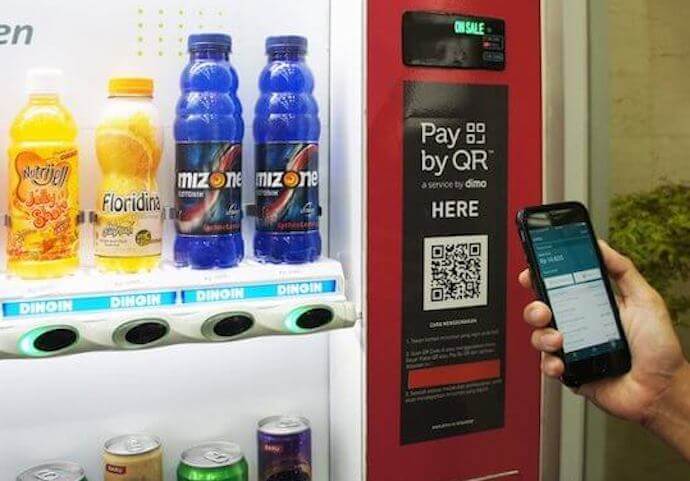
QR codes are everywhere, from restaurant menus to train tickets. Now a growing number of UK operators are asking whether a QR code vending machine could make payments easier, cheaper or more flexible.
This guide explains how a QR code vending machine works, the main benefits, the costs, the security risks to watch for and whether QR payment is better than contactless for your site.
Quick answer: A QR code vending machine lets customers scan a code with their phone to pay, usually through a web page, an app or pay by bank. It works well as an extra payment option alongside contactless.
For most UK sites, contactless should come first. QR adds value for sites with apps, loyalty schemes, younger users or patchy card coverage.
Cashless-ready vending machines
Machines with card readers, telemetry and modern payment options, with free UK delivery, installation and 0% payment plans.
Browse Machines →What is a QR code vending machine?
A QR code vending machine displays a square barcode that customers scan with their phone camera. The code opens a payment page or app linked to that specific machine.
The customer chooses a product, pays on their phone and the machine releases the item once payment is confirmed. There is no need to insert coins or tap a card.
The QR code can be printed on a sticker or shown on the machine’s screen. Screen-based codes can change for every sale, which is more secure.
How QR code payments work
Most QR code vending machine systems follow the same basic steps. The details vary between providers, but the customer journey is similar.
- Choose: the customer selects a product on the machine or on their phone.
- Scan: they scan the QR code with the phone camera.
- Pay: a payment page opens, offering card, Apple Pay, Google Pay or pay by bank.
- Confirm: the payment provider confirms the payment with the machine.
- Vend: the machine releases the product.
The machine and payment system talk to each other through the internet. That is why most QR systems rely on telemetry or a connected card reader.
Static vs dynamic QR codes
A static QR code is printed once and never changes. It is cheap and simple, but easier for fraudsters to copy or cover.
A dynamic QR code is generated on the machine’s screen, often for each sale. It is harder to tamper with and can carry the exact price.
| Feature | Static QR | Dynamic QR |
|---|---|---|
| Where shown | Printed sticker | Machine screen |
| Changes per sale | No | Usually yes |
| Tamper risk | Higher | Lower |
| Cost | Very low | Needs a screen or smart controller |
| Best for | Supervised sites | Public and unattended sites |
QR code vending machine: 7 best proven benefits
1. No extra card for customers
Almost everyone carries a smartphone with a camera. A QR code vending machine lets people pay even if they have left their card or watch behind.
2. Lower payment costs
Some QR systems use pay by bank, which moves money directly from the customer’s bank account. This can cost less than card processing, especially on small purchases.
3. Built-in loyalty and offers
A QR code can open a page that tracks rewards, stamp cards and discounts. This is much harder to do with coins or a simple tap.
4. Cheaper hardware upgrade
On some machines, adding QR payment needs little more than a connected controller or screen. It can be a low-cost way to take cashless payments.
5. Customer data and feedback
Because customers use their phones, operators can offer receipts, ask for ratings and collect product requests. This helps you stock what people actually want.
6. Easy refunds
If a product fails to drop, a good QR code vending machine system can refund automatically to the same payment method. That reduces complaints and support calls.
7. Ready for the future
QR payments are already part of everyday life in many countries. Offering them now keeps your machines ready as UK habits change.
QR code vs contactless
Contactless is still the most popular way to pay at UK vending machines, so it is the natural comparison for any QR code vending machine. Tapping a card or phone takes a second, while scanning a code and paying on a phone takes longer.
| Factor | Contactless | QR code |
|---|---|---|
| Speed | About one second | Usually 10–30 seconds |
| Familiarity in the UK | Very high | Growing |
| Hardware | Card reader needed | Screen or printed code plus connection |
| Fees | Card processing fees | Can be lower with pay by bank |
| Loyalty and offers | Limited | Strong |
| Tamper risk | Low | Higher with printed codes |
For most sites, the best set-up is contactless first, with a QR code vending machine option as a backup or loyalty tool. Our contactless vending machine guide explains card payments in detail.
Pay by bank and QR codes
Pay by bank is a newer way to pay at a QR code vending machine, using open banking. The customer scans a code, picks their bank and approves the payment in their banking app with Face ID or a fingerprint.
Money moves through the Faster Payments system, so it usually arrives almost instantly. Refunds can also be quick.
Pay by bank is still growing in the UK, but it is now used by major online retailers. For a QR code vending machine, it can mean lower fees, though some customers will still prefer cards or wallets.
Security risks and quishing
The biggest risk for any QR code vending machine is fraud using fake codes, sometimes called quishing. Criminals stick their own QR code over a genuine one, sending customers to a fake payment page.
Action Fraud received close to 800 reports of QR code fraud in the year to April 2025, with victims losing around £3.5 million. Investigators found fake QR codes on UK parking machines across hundreds of car parks.
Protect your customers: the safest QR code vending machine shows a dynamic code on its screen. If you use a printed code, put it behind the glass or use tamper-evident labels.
- Use on-screen dynamic codes wherever possible.
- Place printed codes inside the machine window, not on the outside panel.
- Show your brand name and web address next to the code.
- Check machines for stickers on every visit.
- Tell customers they should never be asked for full card details by text or email.
What does QR payment cost?
The cost of running a QR code vending machine depends on the system you choose. There are three common models.
| Model | Typical costs | Best for |
|---|---|---|
| Card reader with QR built in | Hardware plus monthly and per-sale fees | Operators wanting card and QR together |
| Telemetry with QR add-on | Monthly fee, sometimes per-sale fee | Machines already using telemetry |
| App-based QR system | Per-sale fee or subscription | Sites with loyalty schemes or apps |
Always compare the total cost per sale, including card, wallet and bank fees. On low-price items such as a 90p chocolate bar, a few pence in fees makes a big difference.
Our vending machine pricing guide helps you set prices that cover payment costs.
Where QR code vending works best
A QR code vending machine suits some locations more than others. Sites with regular users who already use apps tend to see the best results.
- Offices and workplaces: staff can link payments to a workplace app or allowance.
- Universities: students are comfortable with phone payments and loyalty offers.
- Gyms: members often leave cards in lockers but carry phones.
- Hotels: guests can charge purchases or pay without cash.
- Events: QR codes help where card signal is busy.
See our guides to vending machines for offices, vending machines for universities and vending machines for gyms for more on each site.
Downsides to consider
A QR code vending machine is not perfect. It is worth understanding the drawbacks before you invest.
- Slower: scanning and paying takes longer than a tap.
- Phone needed: customers need a working phone, battery and data.
- Signal issues: poor mobile coverage can slow or stop payments.
- Fraud risk: printed codes can be covered by fake stickers.
- Less familiar: some older customers may not know how to use QR payments.
Because of these limits, a QR code vending machine rarely works well with QR as the only payment option. Offering contactless and, where suitable, coins as well keeps every customer happy.
QR codes beyond payment
A QR code vending machine can do more than take payments, and codes are useful even on cash and card machines. A code on the machine can link to helpful information or services.
- Allergen and nutrition information for each product.
- A form to report a fault or request a refund.
- Product requests and customer feedback.
- Loyalty sign-up and special offers.
- Contact details for the operator.
A fault-reporting code can cut lost sales by alerting you sooner. Customers who know how to get a refund are also less likely to complain.
How to add QR payment to your machines
Turning a standard machine into a QR code vending machine is usually straightforward with a modern controller. Here is a simple approach.
- Check compatibility: confirm whether your machine supports a card reader, telemetry or a screen.
- Choose a provider: compare card readers and telemetry systems that include QR.
- Pick dynamic codes: use on-screen codes for unattended sites.
- Test signal: make sure the machine has a reliable data connection.
- Add clear signs: explain how to scan and pay in one short line.
- Monitor sales: track how many customers choose QR versus contactless.
Our vending machine telemetry and vending machine software guides explain the systems that power QR payments.
QR codes and vending apps
Many QR code vending machine systems connect to an app. The QR code identifies the machine, and the app handles payment, loyalty and receipts.
A QR code vending machine linked to an app works best where the same people buy regularly, such as in offices or on campus. For one-off customers, a simple web payment page is better because nobody wants to download an app for a single drink.
Read our vending machine app guide to see how apps can boost sales.
Signage that gets people scanning
Even the best QR code vending machine needs clear instructions. Customers should understand what to do in a few seconds.
- Place the code at eye level, near the product selection panel.
- Add a short line, such as “Scan to pay with your phone”.
- List accepted payment methods, such as cards, Apple Pay and Google Pay.
- Show where to get help if a product doesn’t drop.
Is QR payment popular in the UK?
The QR code vending machine is far more common in China, India and parts of Europe than in the UK. In the UK, contactless dominates because cards and phone wallets are so widely used.
However, QR use grew quickly after 2020, and pay by bank is gaining ground. A QR code vending machine is a sensible addition for operators who want to stay ahead, as long as contactless remains available.
Choosing the right machine
If you want a QR code vending machine, look for a model with a modern controller, a card reader slot and space for a telemetry unit. Machines with touchscreens can display dynamic codes.
Irelley machines come cashless-ready, and our tap-to-pay glass-front machine and 24H smart vending fridge suit sites that want modern payment options. Browse all vending machines for sale.
Spread the cost with our 0% payment plans. We deliver and install free anywhere in the UK, usually within 24 hours.
Real-world examples
Here is how a QR code vending machine might work at three different UK sites. Each uses QR in a slightly different way.
An office with a staff app
Staff scan the code to charge snacks to a monthly allowance or pay with a saved card. The company sees spending reports, and staff never need cash.
A university campus
Students scan a QR code vending machine to collect loyalty points towards free drinks. Contactless remains available for visitors and staff.
A busy event
When thousands of people overload the card network, an on-screen QR code lets customers pay over their own mobile data. It keeps queues moving when card readers slow down.
Accessibility and inclusion
Not every customer finds QR payments easy. People with sight loss, older customers and those without smartphones may struggle with a QR code vending machine.
That is another reason to keep contactless, and where suitable coins, alongside QR. Large, high-contrast codes and simple instructions also help.
A machine that welcomes every customer will always sell more than one that only suits some. Think of QR as a way to add choice, not remove it.
Measuring whether QR is working
Once your QR code vending machine is live, track a few simple numbers each month. Telemetry and payment dashboards usually show these automatically.
- The share of sales paid by QR versus contactless and cash.
- Average spend per QR transaction.
- How many customers return through loyalty offers.
- Failed or abandoned QR payments.
- Fees paid per sale for each payment method.
If very few people use QR after a few months, focus on contactless and keep QR as a backup. If QR use is strong, consider adding loyalty offers to build on it.
Common mistakes
- Using QR as the only payment option.
- Sticking printed codes on the outside of unattended machines.
- Forcing customers to download an app for one purchase.
- Ignoring payment fees on low-price items.
- Installing QR payment where mobile signal is weak.
- Not checking machines for tampered codes.
The verdict on QR code vending machines
A QR code vending machine adds flexibility, lower-cost payment options and strong loyalty features. It works best as an extra alongside contactless, not as a replacement.
Use dynamic on-screen codes for security, add clear signs and track how customers choose to pay. If you need help choosing a cashless-ready machine, contact our team.
FAQ
Frequently asked questions
A QR code vending machine shows a QR code that customers scan with their phone camera. The code opens a payment page or app, and once payment is confirmed, the machine releases the product.
Not always. Many QR systems open a simple web payment page in the phone’s browser. Others link to an operator’s app, which may need downloading the first time.
It can be. Some QR systems use pay by bank, which can have lower fees than card payments. However, you may still need a card reader for customers who prefer to tap.
Genuine QR payments are safe when the code is secure and the payment page uses a trusted provider. The main risk is fake QR stickers placed over real codes, so codes should be printed on screen or protected.
Often, yes. Many modern payment systems and telemetry units can turn a machine into a QR code vending machine, and some machines with screens can display a dynamic QR code.
For most UK sites, contactless should come first because it is fastest and most familiar. A QR code vending machine option works well as an extra, especially at sites with an app, loyalty scheme or poor card signal.
A good QR system confirms payment with the machine before vending and refunds automatically if the product fails to drop. Customers should also have a clear contact for problems.
Yes. Either the machine or the customer’s phone needs a connection so the payment can be confirmed. Machines with telemetry usually handle this through a mobile data SIM.
They are popular in offices, universities, gyms, hotels and workplaces with apps or loyalty schemes. They are also common in parts of Asia and Europe, where QR payments are part of daily life.
It depends on the system. Some card reader and telemetry packages include QR at no extra hardware cost, while app-based systems may charge a monthly fee or a per-transaction fee.
Yes. A QR code vending machine can link to digital stamp cards, discounts and promotions, helping bring customers back.
Many QR payment pages accept Apple Pay and Google Pay, as well as cards and pay by bank. Check which methods your provider supports.
Ready for cashless vending?
Cashless-ready machines with free UK delivery, installation and 0% payment plans.