

Vending machine cashless payment — the essential UK setup guide.
Vending machine cashless payment is no longer optional — it is the difference between a machine that captures every sale and one that loses 20–30% of potential revenue to customers who do not carry cash. Here is exactly how to set it up.
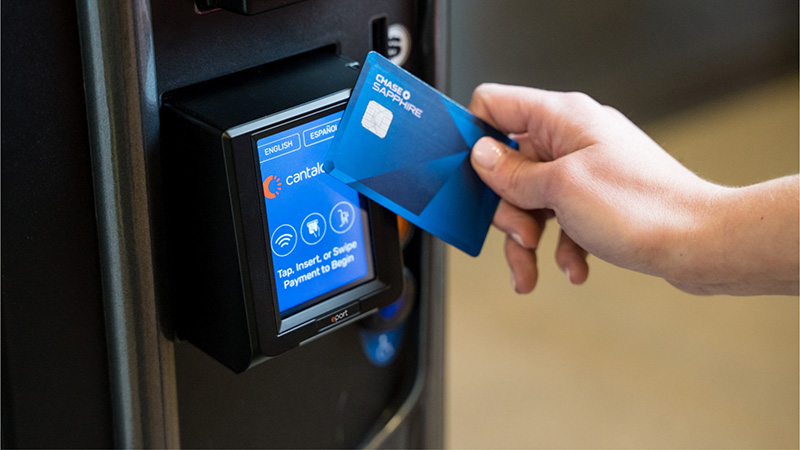
Vending machine cashless payment has gone from a nice-to-have feature to a business necessity in the UK. Cash usage has been declining for years — the Automatic Vending Association (AVA) reports that contactless transactions now account for the majority of vending sales in modern machines, and the trend is accelerating. A vending machine without cashless payment in 2026 is like a shop without a card reader — you are turning away customers who want to buy but cannot pay the way they want to. This guide covers everything a UK operator needs to know about vending machine cashless payment: why it matters, which systems exist, what they cost, how to install them, the transaction fees involved, and the revenue impact you can expect.
Vending machine cashless payment — why it matters now
The case for vending machine cashless payment comes down to three numbers that every UK operator should know:
- 20–30% revenue increase: Operators who retrofit vending machine cashless payment onto previously cash-only machines consistently report a 20–30% increase in sales. This is not because more people walk past — it is because more of the people who walk past can now actually buy something.
- Higher average transaction value: Customers paying by card spend more per transaction than cash customers. The psychological friction of handing over physical coins creates a price sensitivity that contactless payment removes. A customer who hesitates to spend £1.50 in coins taps their card without thinking.
- Younger demographic capture: Customers under 35 rarely carry cash. Without vending machine cashless payment, you are invisible to the largest working-age demographic in most locations. These are exactly the customers who buy energy drinks, protein bars, and premium snacks — your highest-margin products.
A vending machine cashless payment reader typically costs £150–£350 to buy and install. It pays for itself within 4–8 weeks through the additional sales it enables. There is no upgrade in the vending business with a faster ROI than adding contactless payment to a cash-only machine.
Vending machine cashless payment — the technology options
| Technology | How it works | Typical cost | Best for |
|---|---|---|---|
| Contactless card reader (MDB) | Connects to machine’s MDB bus. Accepts Visa, Mastercard, Amex via tap. | £150–£300 | Most vending machines with standard MDB protocol |
| Contactless + mobile payments | Accepts cards + Apple Pay + Google Pay via NFC | £200–£350 | High-traffic locations, younger demographics |
| QR code payment | Customer scans QR code on machine, pays via app | £50–£150 | Budget retrofit, machines without MDB compatibility |
| Telemetry + cashless combo | Card reader with built-in remote monitoring, sales data, and stock alerts | £300–£500 | Operators scaling to 10+ machines who want data and payments in one system |
MDB protocol — what you need to know
Most commercial vending machines manufactured after 2000 use the MDB (Multi-Drop Bus) protocol — an industry standard communication system that allows peripheral devices (coin mechanisms, note validators, card readers) to communicate with the machine’s main controller. Vending machine cashless payment readers that connect via MDB are plug-and-play for compatible machines — they communicate using the same protocol the coin mechanism uses, so the machine treats a card payment exactly like a coin insertion. If your machine has an MDB port (most do), installation is straightforward. If it does not (very old or non-commercial machines), you may need a QR-based or standalone solution instead.
Many of our machines come contactless-ready
Browse our range — several models include built-in card readers or MDB-compatible ports for easy retrofit.
Browse Machines →Vending machine cashless payment — UK providers
Several companies specialise in vending machine cashless payment solutions for the UK market. Here are the main options:
| Provider | Reader cost | Transaction fee | Monthly fee | Key features |
|---|---|---|---|---|
| Nayax | £200–£350 | ~3–5% | £0–£15 | Market leader, telemetry options, global support, app payments |
| Payter | £150–£250 | ~2.5–4% | £0–£10 | Compact reader, simple setup, competitive fees |
| Vendman | £200–£300 | ~3–4.5% | £5–£15 | UK-focused, telemetry + cashless combo, good support |
| iVend | £180–£280 | ~3–5% | £5–£12 | Cloud-based management, real-time reporting |
| Crane CPI | £250–£400 | ~2.5–4% | £0–£10 | Premium hardware, long warranty, enterprise-grade |
When choosing a vending machine cashless payment provider, the transaction fee matters more than the hardware cost over time. A reader that costs £50 more but charges 1% less per transaction saves you money from month three onwards on a busy machine. Calculate your expected monthly card revenue and multiply by the fee percentage to compare providers on total cost, not upfront price alone.
Vending machine cashless payment — installation steps
Installing a vending machine cashless payment reader is a task most operators can handle themselves in 30–60 minutes. The process for a standard MDB-compatible reader:
- Power off the machine: Unplug from mains power. Safety first — you are working with electrical connections.
- Locate the MDB bus: Open the machine and find the MDB cable — typically a ribbon cable or harness connecting the coin mechanism to the main controller board. Your reader will connect inline on this bus.
- Connect the reader: Most vending machine cashless payment readers use a pass-through connection — unplug the coin mechanism from the MDB bus, plug the coin mechanism into the reader, and plug the reader into the MDB bus. The reader sits between the controller and the coin mechanism.
- Mount the reader: Attach the contactless pad to the machine exterior using the provided mounting kit. Position it at a natural height where customers will see and reach it — typically near the selection keypad or the coin slot.
- Power on and configure: Restore power. The reader will typically enter setup mode automatically. Connect it to your provider’s management portal via the reader’s SIM card or Wi-Fi connection to configure pricing, enable payment types, and activate your merchant account.
- Test: Make a test purchase with your own card. Verify the transaction appears in your management portal. Check that the machine dispenses correctly and the card reader resets for the next transaction.
If your machine does not have an MDB port or you are unsure about compatibility, contact us before purchasing a reader. We can advise which vending machine cashless payment solution works with your specific machine model — and many of our machines for sale come with readers already installed.
Vending machine cashless payment — understanding transaction fees
Every vending machine cashless payment transaction incurs a fee — typically 2.5–5% of the transaction value. This is the cost of accepting card payments, and it is paid to the payment processor, not to the card reader manufacturer. Here is how the fees impact your margins:
| Monthly card revenue | Fee at 3% | Fee at 5% | Net revenue after fees |
|---|---|---|---|
| £200 | £6 | £10 | £190–£194 |
| £400 | £12 | £20 | £380–£388 |
| £600 | £18 | £30 | £570–£582 |
| £800 | £24 | £40 | £760–£776 |
The fees are real — but they are dramatically offset by the 20–30% revenue increase that vending machine cashless payment delivers. A machine generating £400/month in cash-only sales that adds contactless and jumps to £500–£520/month is generating £100–£120 in additional revenue while paying £15–£26 in fees. The net gain is £74–£105/month — and that is pure incremental profit from sales that would not have happened without the card reader.
Vending machine cashless payment — common mistakes
- Hiding the reader: If customers cannot see the contactless symbol, they assume the machine is cash-only and walk away. Mount the reader prominently with a clear “contactless accepted” sticker. Visibility drives usage.
- Removing the coin mechanism: Some operators remove the coin acceptor after installing vending machine cashless payment. Do not do this. A percentage of customers — particularly older demographics and those in rural locations — still pay with cash. Accept both.
- Ignoring connectivity: Most card readers require a mobile data connection (SIM) to process transactions. Check signal strength at your machine location before installation. A reader with no signal cannot process payments. Some providers offer Wi-Fi-enabled readers for locations with poor mobile coverage.
- Not monitoring transaction reports: Vending machine cashless payment systems generate detailed sales data — which products sell, at what times, how many transactions per day. Ignoring this data means ignoring the most powerful restocking and product-mix optimisation tool available to you.
- Choosing the cheapest provider without reading the contract: Some providers lock you into long contracts (24–36 months) with early termination fees. Others charge monthly minimums regardless of transaction volume. Read the terms before signing — the cheapest reader is not always the cheapest total cost.
“Vending machine cashless payment is the single highest-ROI upgrade available to any UK vending operator. A £200 reader that increases revenue by 25% on a £400/month machine generates an additional £1,200/year in revenue — a 600% return on investment in year one. No other upgrade comes close.”
Common questions — vending machine cashless payment
Machines ready for cashless payment.
Browse our stock of 70+ tested machines — many with contactless readers already installed or MDB-compatible for easy retrofit.